
How to Hard Reset a Shark Robot Vacuum
Is your Shark robot vacuum frozen, not starting a clean, or not responding after it returns to the dock? Don't panic, a hard reset can often clear a small software problem and get the robot working again.
Luckily, you normally do not need to take the robot apart for this. Here we will cover how to hard reset a Shark robot vacuum safely and what you should check if it still is not responding.
Reset Your Shark Robot
To hard reset a Shark robot vacuum, start by placing it on the charging dock and holding the Dock button for 5 to 7 seconds if your model supports this. Some Shark robots use a power switch instead, so turn that model off for at least 10 seconds before turning it back on. Then let the robot restart on the dock before trying a cleaning cycle again.
Shark robot reset methods can be different between models. Check your owner guide for the exact buttons on your robot, and do not force any cover open.
Try a Dock Button Restart First
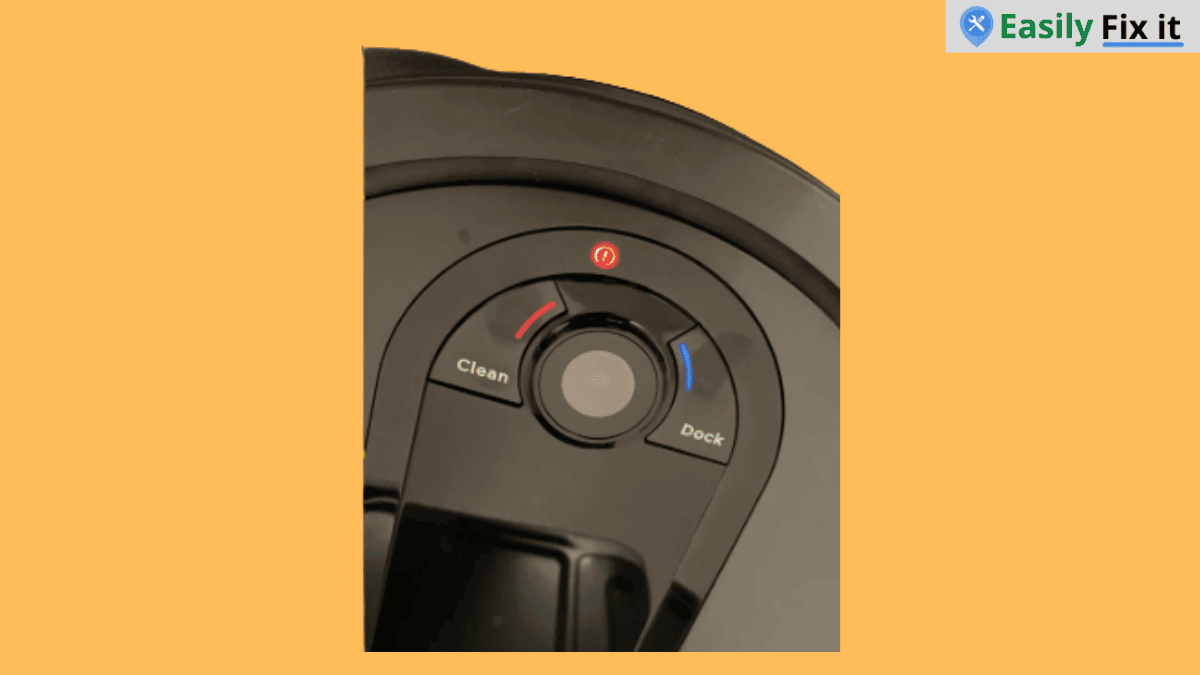
First, place the Shark robot vacuum correctly on its charging dock. On many models, holding the Dock button for 5 to 7 seconds turns the robot on or restarts it.
Before you try it, make sure the charging contacts on the robot are touching the contacts on the dock. Here is what to do:
- Place the robot squarely on the charging dock
- Check that the dock has power
- Press and hold the Dock button for 5 to 7 seconds
- Wait for the indicator lights to come on
- Allow the robot a few minutes before starting a clean
Use the Power Switch (if your Model has)
Some Shark robot vacuums have a power switch instead of using the Dock button for a restart. If your owner guide shows a power switch, turn it off, wait at least 10 seconds, then turn it back on.
Put the robot back on its dock after turning it on. If you cannot find a switch or the buttons do not match this guide, follow the reset steps in the guide for your exact model.
Let the Robot Restart on the Dock
After turning it back on, place the robot squarely on the charging contacts. The robot needs a good connection with the dock before you test it.
Wait a few minutes, then press Clean on the robot or use the Shark app if your model supports it. Some models takes a little time to connect again after a reset.
Charge the Robot Before Testing It
If the Shark robot has a low battery, it may look like the reset did not work. Leave it on the dock until it has enough charge, then start a short cleaning cycle.
Check that the dock is plugged in and that its charging contacts are clean. A dry cloth is normally enough to wipe dust from the robot and dock contacts.
Check for a Blockage or Full Dust Bin
A reset will not fix a physical problem. Turn the robot off again and check the wheels, side brush, main brush, and dust bin for hair or debris.
If the robot is showing a bin-related message, you can also read our Shark vacuum dust cup error guide. Make sure the bin is fitted correctly before starting the robot again.
When a Hard Reset Does Not Help
If the Shark robot vacuum still will not turn on, will not charge, or shows the same error after the reset, check the model number and look in the owner guide for that exact message.
Further, contact Shark support if the robot is under warranty, has a damaged battery, gets unusually hot, or has a burning smell. Do not open the battery compartment or try to repair internal wiring yourself.
Conclusion
A hard reset is a simple thing to try when your Shark robot vacuum freezes or stops responding. Turn it off, wait at least 10 seconds, turn it back on, and let it restart on the dock before testing it.
- Turn the Shark robot off using its power switch
- Wait at least 10 seconds before turning it back on
- Restart it on a clean, powered charging dock
- Check the bin, brushes, and wheels for debris
- Contact Shark for battery or internal electrical problems
Need More Help With Your Shark Vacuum?
Don't panic. Use our Shark vacuum troubleshooting tool to select the problem you are having. Answer a few easy questions and get the solution.
Use Our Shark Vacuum TroubleshooterWas this page helpful?
Thanks for your feedback!
Written by
Muhammad Ali is an Electrical Engineer and Appliance Repair Specialist from Canada, who has been helping people fix their appliances since 2020.